
 whatsminer
 2026.05.26
 3K+
3K+ 0
0

1. How to complete miner firmware upgrade using only an Android phone and an SD card?
This operation is not supported. Firmware upgrade can only be performed via a Windows PC.
2. In WhatsMinerTool, what precautions should users take before upgrading firmware?
Firmware upgrades require selecting compatible files (e.g., Whatsminer-M3x-all-20241103.23.bin for M3x/M5x/M6x series). Users must ensure miners are online and running firmware versions after 20241011.12 for full functionality. After selecting the IP addresses of target miners, clicking Start Upgrade initiates the process. If the status shows Failure, users should verify network stability or firmware compatibility.
3. How is SN of the entire miner currently obtained in API and WhatsMinerTool?
Currently, after scanning a miner on WhatsMinerTool, its SN can be obtained automatically. Additionally, our API has been enhanced with the ability to retrieve a miner's SN. However, this requires a firmware upgrade for the miner. The firmware file name is Whatsminer-M3x-all-20250321.14.bin, which can be downloaded from our official website.
4. How are pools configured using WhatsMinerTool?
Before you start
Click Settings to enter a Setting Dialog box, select IP Suffixes Count from 1 to 4 to configure worker’s IP suffix count, and then click Save to save the configuration. Other options can be configured as needed.
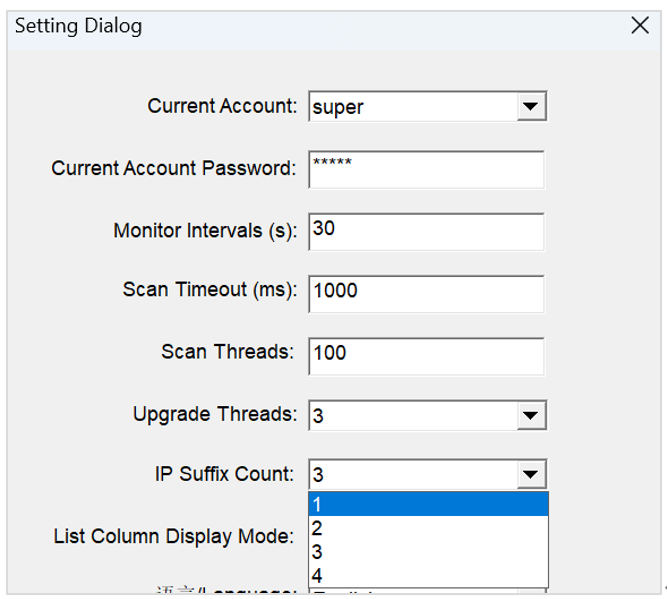
Figure 4-1
Step 1 Click Pools, and then configure a pool address, a worker name, a suffix form, a password, and a coin type.
You can configure one or more pools as needed.
Step 2 Select an IP address of a miner that needs to configure the pool and the worker, and then click Start Upgrade.
Step 3 After a dialog box pops up, click OK to complete the configuration.
 Yes
Yes No
No Feedback
- 1WhatsMinerTool_Operation Guide15K+
- 2WhatsMiner Air Cooling Miner_Operation Guide11K+
- 3WhatsMiner Hydro-Cooling Miner_Operation Guide11K+
- 4WhatsMiner API_User's Manual8K+
- 5WhatsMiner Immersion Cooling Miner_Operation Guide7K+
- 6WhatsMinerTool: Performance, Power & Remote Functions Q&A6K+
- 7WhatsMinerTool Overclocking Guide6K+
- 8Simple introduction to quick connectors for hydro-cooling miners5K+
- 9Overclocking Eligibility & Performance Impact Q&A4K+
- 10WhatsMiner Hydro-Cooling Series Installation & Removal Guide4K+