
 whatsminer
 2026.06.12
 7K+
7K+ 0
0

1. What adjustments should be made if the hashrate fails to meet the standard after setting the performance mode in WhatsMinerTool?
For example, the goal is to raise the hashrate to the maximum level without considering power consumption. The performance mode has been set to [Normal (10%-20%-30%-40%)] in WhatsMinerTool, yet the hashrate fails to reach the set value. What operations should be carried out?
Switch to “High Mode” to achieve the maximum hashrate.
2. How does Performance Mode affect mining operations in WhatsMinerTool?
High Performance Mode increases hashrate by operating miners at higher frequencies, ideal for maximizing output during favorable market conditions. However, this raises power consumption. Low Performance Mode reduces energy usage but lowers hashrate. The high performance mode is only available in M30S series and subsequent models of miners, and it is required that the voltage be higher than 230 V.
3. I am still using an M21S miner and would like to know if a custom firmware is available to enable low-power mode operation?
Performance mode adjustment is not supported for the M20X series (including the M21S).
4. In WhatsMinerTool, how to configure frequency search speed?
Increasing frequency search speed can shorten time from startup to operation and reduce relative power consumption, but it may also bring a stability risk.
Step 1 Select an IP address of a miner you want to configure its frequency search speed.
You can also select multiple IP addresses of multiple miners.
Step 2 Click Remote Ctrl, click Performance, click Adjust Upfreq Speed, and then click OK.

Figure 4-1
Step 3 After a dialog box pops up, you can drag a slider to select a number from 0 to 10, and then click OK.
You can adjust frequency search speed from 0 to 10. 0 indicates normal frequency search speed, 10 indicates fast frequency search speed. The larger the number is, the faster the frequency search speed is.
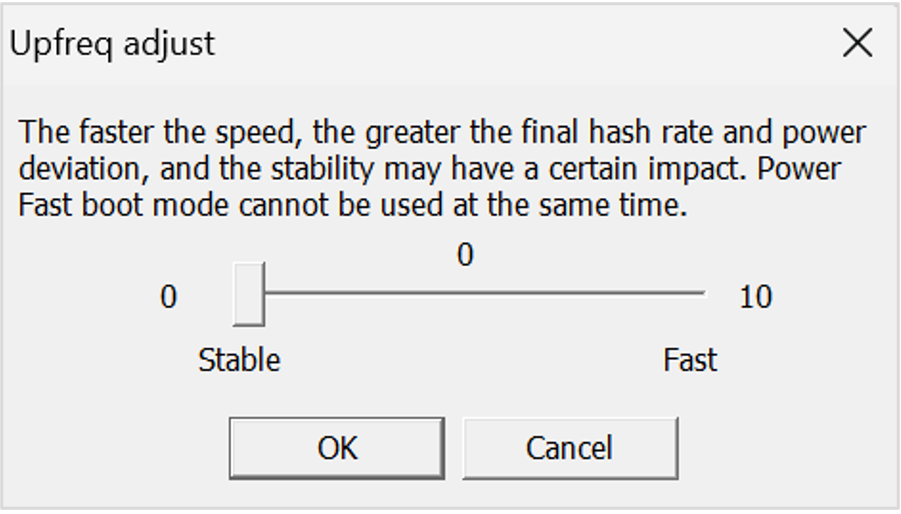
Figure 4-2
5. What role does "Frequency Search Speed Adjustment" play in WhatsMinerTool?
Increasing frequency search speed shortens the time miners take to stabilize at target frequencies post-startup and reduce relative power consumption, but it may also bring a stability risk. 0 indicates normal frequency search speed, 10 indicates fast frequency search speed. The larger the number is, the faster the frequency search speed is.
6. When using WhatsMinerTool to overclock the miner, there are multiple ways to use in Remote Control. Are there any requirements for selecting these different ways?
If you adjust frequently, use Power Adjustment so that the miner will not restart.
If no further action is required after adjustment, use Performance Mode.
If the power adjusted after using Performance Mode is not suitable, use Adjust Frequency.
7. How to optimize miner operation using the power limit function in WhatsMinerTool?
Setting a power limit caps the maximum power consumption of the miner, improving operational stability. Enter a value (0-99999 W) in the "Power Limit" field, ensuring it does not exceed the miner’s actual rated maximum power. Setting the limit too low may cause unstable operation.
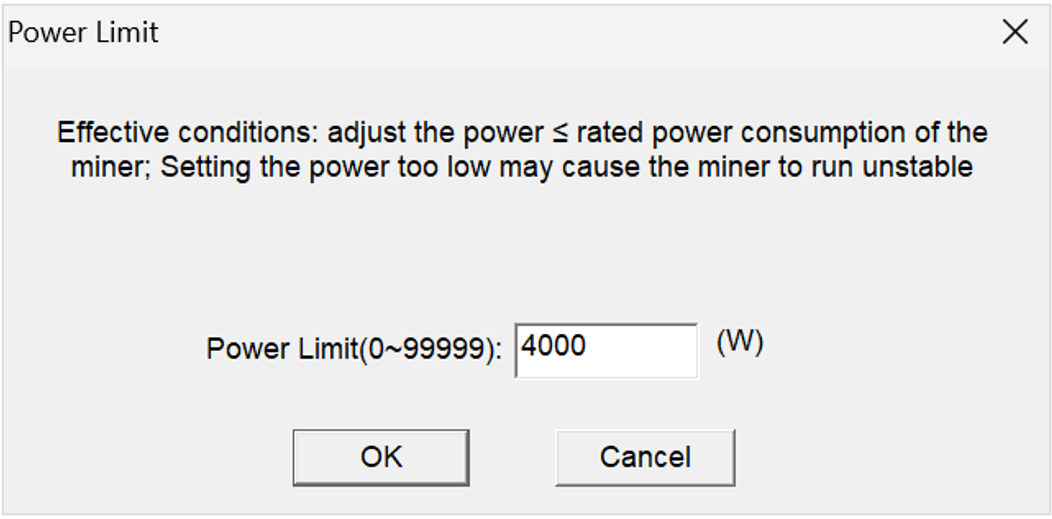
Figure 7-1
8. How does the "Power Fast Boot" function work in WhatsMinerTool?
Enabling Power Fast Boot reduces startup time by allowing miners to reach full load within one minute. This minimizes power fluctuations but does not enhance hashrate. The feature requires firmware version 20200801 or newer and is compatible with M30 series and subsequent models of miners.
9. How can I activate the Power Fast Boot function in WhatsMinerTool?
When you want your miner to quickly reach full power during a startup phase, you can use this feature to set it up
Step 1 Select an IP address of a miner you want to quickly increase its power.
You can also select multiple IP addresses of multiple miners.
Step 2 Click Remote Ctrl, click Performance, click Power Fast Boot, and then click OK.

Figure 9-1
Step 3 After a dialog box pops up, you can select Enable or Disable, and then click OK to enable or disable a power fast boot switch function.
After restarting the miner, its load can quickly reach a rated load within one minute in a startup stage, and load fluctuation can be reduced.
Note:
This function cannot improve computing speed.
You need to upgrade a firmware of the miner to an official version 20200801 and later, and only M30 series and subsequent miners support this function.
10. What remote control features are available in WhatsMinerTool?
Key remote control functions include:
Reboot: Restart selected miners.
Miner Control: Pause or resume mining operations.
Performance Mode: Switch between High, Normal, or Low power modes.
LED Control: Flash LEDs for physical identification.
Export Log: Save diagnostic logs for troubleshooting.
API Switch: Enable/disable API access for third-party integrations.
11. Will overclocking miners using WhatsMinerTool affect warranty of miners?
The official WhatsMinerTool has an overclocking feature. When using the official tool for overclocking, it is within the warranty scope. If using third-party firmware, it will be considered out of warranty. The use of non-official firmware will be reflected in the server logs.
12. How can I quickly adjust the power of a miner?
The miner itself has a normal power mode and a high power mode, which can be switched using WhatsMinerTool.
 Yes
Yes No
No Feedback
- 1WhatsMinerTool_Operation Guide17K+
- 2WhatsMiner Hydro-Cooling Miner_Operation Guide13K+
- 3WhatsMiner Air Cooling Miner_Operation Guide12K+
- 4WhatsMiner API_User's Manual9K+
- 5WhatsMiner Immersion Cooling Miner_Operation Guide8K+
- 6WhatsMinerTool: Performance, Power & Remote Functions Q&A7K+
- 7WhatsMinerTool Overclocking Guide7K+
- 8Simple introduction to quick connectors for hydro-cooling miners6K+
- 9Overclocking Eligibility & Performance Impact Q&A5K+
- 10WhatsMiner Hydro-Cooling Series Installation & Removal Guide5K+