
 whatsminer
 2026.06.11
 4K+
4K+ 0
0

1. What would be a good approach to handle Error Code 2010 in WhatsMinerTool?
It is recommended to first check for connection issues by re-seating ribbon cables and adaptor board.
2. My miner is now showing 4 error codes: 300, 320, 321, and 421. Could you please advise on how to resolve these errors?
It is recommended to first check for connection issues by re-seating ribbon cables and adaptor board.
3. How to troubleshoot error code 9110?
Replace the PSU to check. For details, refer to the error code description on our website.
4. How to resolve event code E009 and error code 410 displayed on slot 0 of the miner?
It indicates the adaptor board has an issue, replace it and observe if there are still any error codes.
5. How to resolve miner error codes 530 (Slot 0 not found) and 542 (Slot 0 reading chip Id error) shown in WhatsMinerTool?
Power off the miner, swap the position of hashboard SM0 and SM2, then reboot the miner to check if there are any error codes, and if so, solve the error according to the solution provided in the error code description on our official website.
6. What causes error code 201 (Power supply mismatch)?
Error 201 occurs when power supply models (e.g., P21D vs. P21E) are incompatible with configuration files. Resolving this requires replacing the power supply with a model matching the miner’s specifications. Mixing incompatible units disrupts voltage regulation and risks hardware damage.
7. Can fan speed adjustments in WhatsMinerTool lower air cooling miner temperatures?
This function is not supported. The fan speed is determined by the miner’s temperature and the ambient temperature to ensure that the miner operates at its optimal temperature.
8. In WhatsMinerTool, how to perform restoration settings on a miner?
If you want to restore a miner to its original state, you can use WhatsMinerTool to complete this operation.
Step 1 Select an IP address of a miner you want to restore.
You can also select multiple IP addresses of multiple miners.
Step 2 Click Remote Ctrl, click Basic, click Reboot, and then click OK.

Figure 8-1
Step 3 After a dialog box pops up, select Restore DHCP, Restore Factory Setting, or Restore Miner Setting as needed, and then click OK to restore the DHCP, settings, or factory settings of the miner.
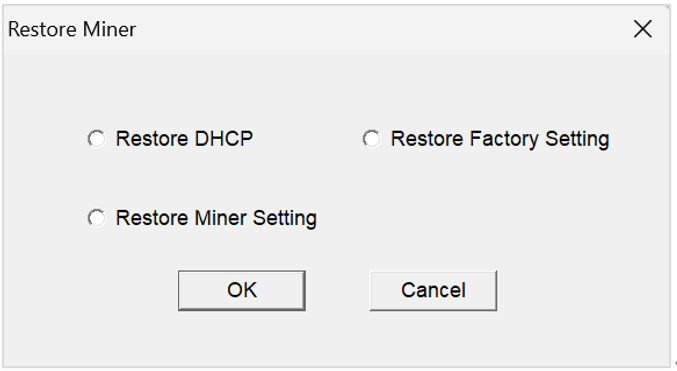
Figure 8-2
9. How can miners be identified physically using WhatsMinerTool?
The LED Control function flashes lights on selected miners, helping you or technicians locate specific units in large installations. After identification, LEDs can be reset to normal operation via the same menu.
10. What is the fuction of protection mode in WhatsMinerTool?
By configuring this feature, miners can maintain power and continue to operate in the event of sudden situations such as network outages, while also ensuring that hydro-cooling miners do not freeze at temperatures below zero, allowing them to operate normally.
11. How can I configure the protection mode for the miner in WhatsMinerTool?
By configuring this feature, miners can maintain power and continue to operate in the event of sudden situations such as network outages, while also ensuring that hydro-cooling miners do not freeze at temperatures below zero, allowing them to operate normally.
Step 1 Select an IP address of a miner you want to configure its protection mode.
You can also select multiple IP addresses of multiple miners.
Step 2 Click Remote Ctrl, click Basic, click Protection Mode, and then click OK.

Figure 11-1
Step 3 After a dialog box pops up, you can select to switch to Power-Keeping mode, and then click OK.
Power-Keeping: After you select this mode, the selected miner will maintain the power and continue to operate after the network outages.
default mode: After you select this mode, a selected hydro-cooling miner will be automatically heated to 5°C-10°C to prevent the inside of a hydro-cooling plate from freezing.
Note:
l For hydro-cooling miners, immersion cooling miners, and air cooling miners, their default protection mode is default mode. default mode is only valid for the hydro-cooling miners.
l If water flow is abnormal, the selected hydro-cooling miner will not maintain the power, and its protection mode will automatically switch to the anti-freezing mode, that is default mode.

Figure 11-2

Figure 11-3
12. What types of protection modes are available, and what specific effects do they have?
There are two types in total, briefly explained as follows:
Power-Keeping: After you select this mode, the selected miner will maintain the power and continue to operate after the network outages.
default mode: After you select this mode, a selected hydro-cooling miner will be automatically heated to 5°C-10°C to prevent the inside of a hydro-cooling plate from freezing.
Note:
For hydro-cooling miners, immersion cooling miners, and air cooling miners, their default protection mode is default mode. default mode is only valid for the hydro-cooling miners.
If water flow is abnormal, the selected hydro-cooling miner will not maintain the power, and its protection mode will automatically switch to the anti-freezing mode, that is default mode.
 Yes
Yes No
No Feedback
- 1WhatsMinerTool_Operation Guide17K+
- 2WhatsMiner Hydro-Cooling Miner_Operation Guide13K+
- 3WhatsMiner Air Cooling Miner_Operation Guide12K+
- 4WhatsMiner API_User's Manual9K+
- 5WhatsMiner Immersion Cooling Miner_Operation Guide8K+
- 6WhatsMinerTool: Performance, Power & Remote Functions Q&A7K+
- 7WhatsMinerTool Overclocking Guide7K+
- 8Simple introduction to quick connectors for hydro-cooling miners6K+
- 9Overclocking Eligibility & Performance Impact Q&A5K+
- 10WhatsMiner Hydro-Cooling Series Installation & Removal Guide5K+